SQL Server Integration
Connect a Microsoft SQL Server instance to Metaustral and automatically discover tables, views, columns, and foreign keys.
Prerequisites
- A SQL Server instance (2012 or later) reachable from the Metaustral cloud — or use the On-Premise Agent for private networks.
- A SQL login with at least
VIEW DEFINITIONandSELECTonINFORMATION_SCHEMA. - TCP/IP enabled on port
1433(or a custom port) and allowed through any network firewalls. - Starter, Pro, or Enterprise plan (database connections are not available on the Free plan).
How to connect
Open Integrations
From the Data Management menu, select Integrations and click + New connection.
Select SQL Server as the type
Choose SQL Server from the Type dropdown. The form will update to show the required fields.
Fill in the connection details
Enter the connection name, host/server, port (default 1433), database name, username, password, and an optional schema filter (e.g. dbo, sales). Click Save.
Import metadata
Go to Import → From a connection, select your new connection, browse the available schemas and tables, and click Confirm import to create the catalog assets.
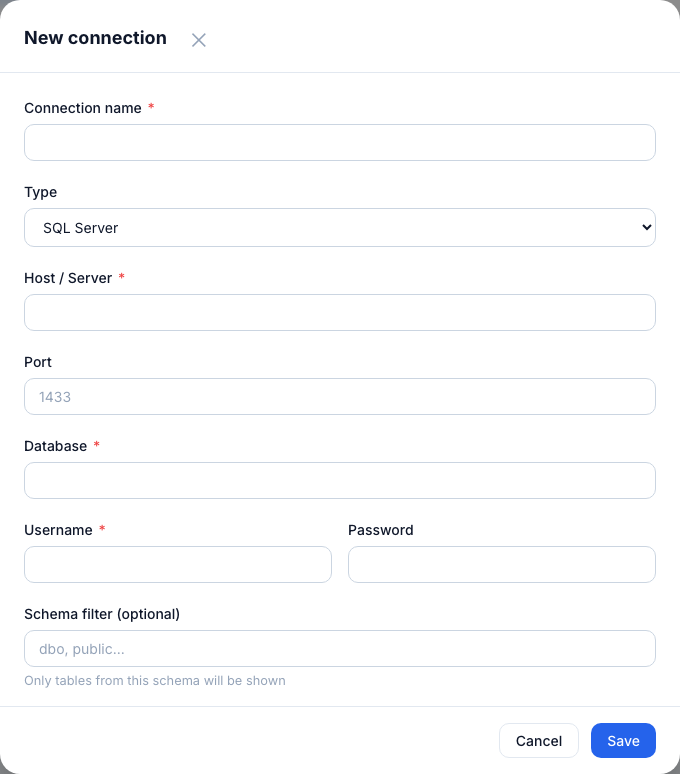
SQL Server connection form — host, port 1433, database, username, password, and optional schema filter.
Connection fields
| Field | Required | Notes |
|---|---|---|
| Connection name | Yes | A label for this connection in the catalog. |
| Host / Server | Yes | IP address or hostname of your SQL Server. |
| Port | Yes | Default: 1433. |
| Database | Yes | The database to introspect. |
| Username | Yes | SQL login with VIEW DEFINITION rights. |
| Password | Yes | Stored encrypted with Fernet — never readable in plain text. |
| Schema filter | No | Comma-separated list. If blank, all schemas are shown. |
Tip: Create a dedicated read-only SQL login for Metaustral. The discovery process only reads
INFORMATION_SCHEMA and never accesses row data.