Databricks Integration
Connect a Databricks workspace to Metaustral using a personal access token and discover Unity Catalog tables, schemas, and metadata.
Prerequisites
- A Databricks workspace (AWS, Azure, or GCP) with Unity Catalog or Hive Metastore enabled.
- A Personal Access Token — generate one in Databricks under User Settings → Developer → Access Tokens.
- An HTTP Path for a running SQL Warehouse — found under SQL Warehouses → Connection details.
- Starter, Pro, or Enterprise plan.
How to connect
Open Integrations and click + New connection
Select Databricks as the type
Fill in the connection details
Enter your workspace Host (e.g. adb-1234567890.azuredatabricks.net), Port (default 443), Catalog, HTTP Path, and your Personal Access Token.
Save and import metadata
Go to Import → From a connection, select this connection, browse the available schemas and tables, and click Confirm import to create the catalog assets.
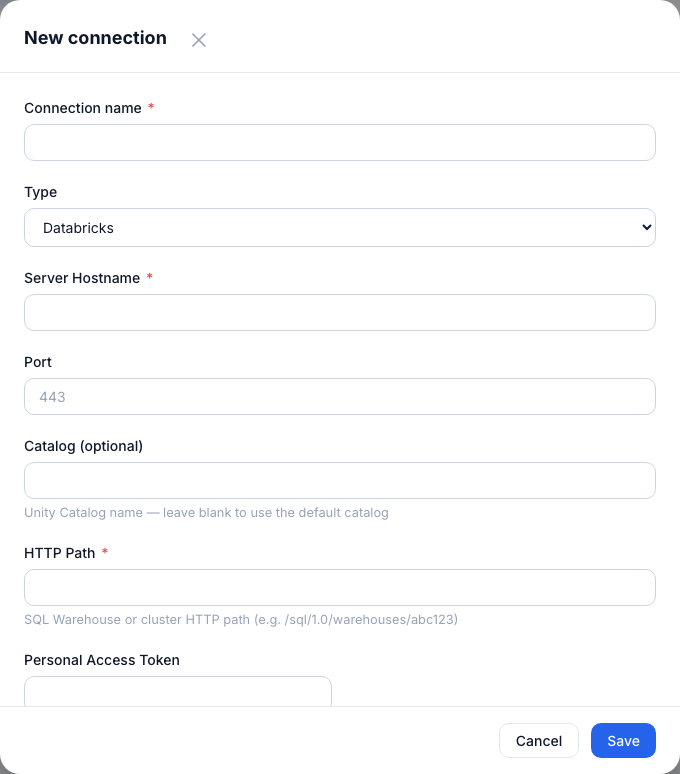
Databricks connection form — host, port 443, catalog, HTTP path, and personal access token.
Connection fields
| Field | Where to find it |
|---|---|
| Host | Your Databricks workspace URL without https://. |
| Port | Always 443 for HTTPS. |
| Catalog | Unity Catalog name (e.g. main) or hive_metastore. |
| HTTP Path | Found in SQL Warehouses → your warehouse → Connection details. Format: /sql/1.0/warehouses/abc123. |
| Access Token | User Settings → Developer → Access Tokens → Generate new token. |
Tip: Tokens expire — set a long expiry or automate rotation. Store the token securely; Metaustral encrypts it at rest using Fernet, but it is visible during the configuration step.