Snowflake Integration
Connect your Snowflake data warehouse to Metaustral and automatically discover databases, schemas, tables, and views.
Prerequisites
- An active Snowflake account with a running virtual warehouse.
- A Snowflake user with
USAGEon the warehouse andREFERENCES(or higher) on the target database and schemas. - Starter, Pro, or Enterprise plan.
How to connect
Open Integrations and click + New connection
Select Snowflake as the type
Fill in the Snowflake-specific fields
Enter your Account Identifier (e.g. xy12345.us-east-1), Database, Warehouse, an optional Role, and your Username and Password.
Save and import metadata
Go to Import → From a connection, select this connection, browse the available schemas and tables, and click Confirm import to create the catalog assets.
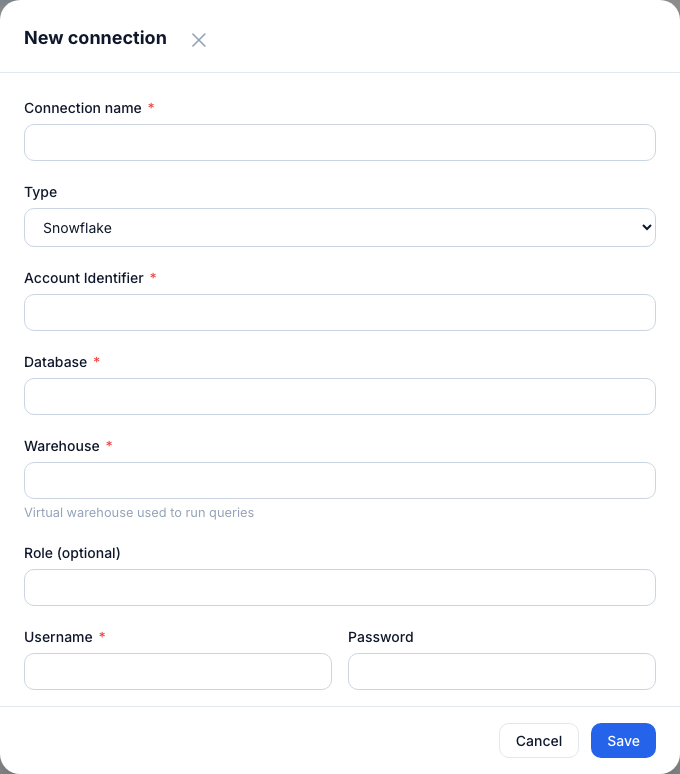
Snowflake connection form — account identifier, database, warehouse, optional role, username, and password.
Connection fields
| Field | Notes |
|---|---|
| Account Identifier | Found in Snowflake under Admin → Accounts. Format: orgname-accountname or locator.region. |
| Database | The Snowflake database to introspect. |
| Warehouse | Virtual warehouse used to run the introspection queries. |
| Username | Snowflake user with USAGE on the warehouse and REFERENCES on the target database. |
| Password | Stored encrypted with Fernet — never readable in plain text. |
| Role (optional) | Overrides the default role for this session. Use if your user needs a specific role to access the target database. |
Tip: Create a dedicated Snowflake role with minimal privileges:
GRANT USAGE ON WAREHOUSE my_wh TO ROLE metaustral_ro; GRANT REFERENCES ON ALL TABLES IN DATABASE mydb TO ROLE metaustral_ro;