
Still using excel to catalog your data? This is how you can improve it
Introduction
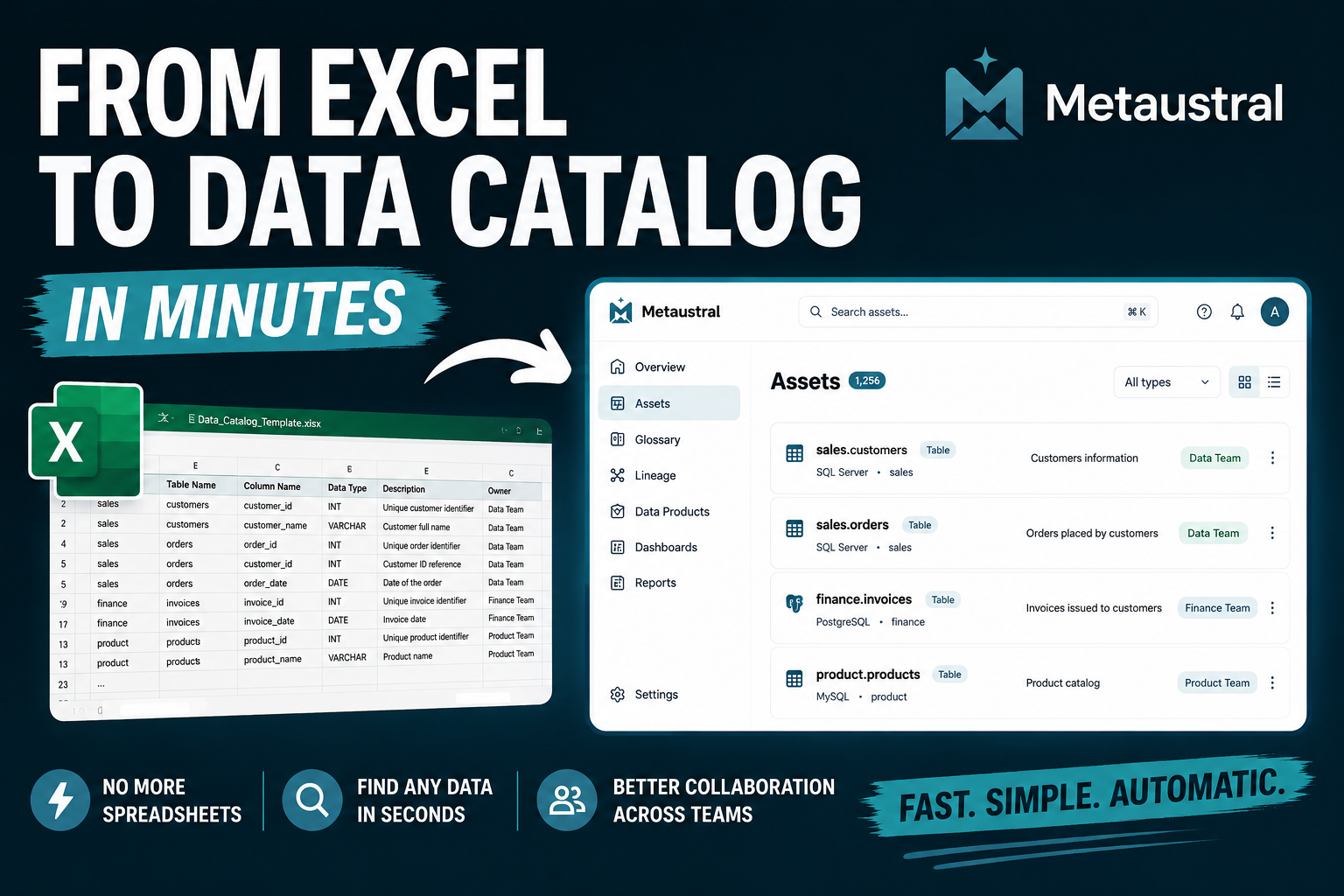
For decades, Excel has been the go-to tool for organizing information in organizations of all sizes. Its flexibility and ease of use make it possible to quickly create product lists, inventories, asset registers, customer databases, supplier directories, or virtually any type of data catalog without requiring technical expertise.
However, as an organization grows, so does the amount of information it needs to manage. What started as a simple spreadsheet gradually becomes a shared file used across multiple departments, containing hundreds or even thousands of records, multiple versions, complex formulas, and an increasing risk of errors, duplicate data, and information loss.
At this point, Excel stops being a data management solution and starts becoming a productivity bottleneck. Finding the right information takes longer, tracking who made changes becomes difficult, and maintaining data consistency turns into an increasingly challenging task.
The good news is that there's no need to start from scratch. Today, it's possible to transform an Excel-based data catalog into a professional platform that centralizes information, establishes relationships between data, tracks version history, manages user permissions, and enables secure collaboration across teams.
In this guide, we'll explore the main limitations of managing a data catalog in Excel, discuss when it's time to move to a professional solution, and show how to make the transition easily using a SaaS platform specifically designed for data catalog management.
What Challenges Arise as Your Data Grows?
When a company first starts managing its information, Excel is often more than enough. It's fast, flexible, and almost everyone knows how to use it. However, as the amount of data, the number of users, and the complexity of business processes increase, limitations begin to emerge that directly impact productivity and data quality.
Multiple Versions of the Same File
One of the most common problems is the proliferation of duplicate files. Documents with names such as Catalog_v2.xlsx, Catalog_Final.xlsx, or Catalog_Final_Final.xlsx end up scattered across different folders or shared via email, making it difficult to identify which version contains the most up-to-date information.
Errors and Duplicate Records
When data is entered manually, it's easy to make typing mistakes, create duplicate records, or leave required fields incomplete. Over time, these small issues accumulate, reducing the reliability of the catalog and affecting reports, analytics, and business processes that depend on accurate data.
Difficult Team Collaboration
When multiple people need to update the catalog simultaneously, collaboration becomes increasingly challenging. Although Excel offers shared editing capabilities, users still frequently encounter editing conflicts, file locks, and uncertainty about who made specific changes.
Lack of Control and Traceability
Many organizations need to know who created a record, when it was modified, and what changes were made. Spreadsheets are not designed to provide detailed audit trails, making it difficult to monitor data changes, investigate issues, or meet compliance requirements.
Information That Is Difficult to Relate
As the volume of data grows, new requirements naturally emerge: linking products to suppliers, documents to customers, assets to locations, or projects to their owners. In Excel, these relationships are typically managed through worksheet references or complex formulas, making the workbook harder to maintain and more prone to errors.
Security Limitations
Not all information should be accessible to every user. However, spreadsheets offer limited options for managing granular permissions. In many cases, anyone with access to the file can view or modify information that should be restricted.
Limited Scalability
A catalog that starts with just a few dozen records can eventually grow to thousands or even millions. As the dataset expands, searches become slower, filters become more complex, and maintaining the spreadsheet requires significantly more time and effort.
Ultimately, the problem isn't Excel itself. The real issue is using a tool designed for spreadsheets as if it were a database or a data management platform. When data becomes a strategic business asset, adopting a solution specifically designed to manage it is no longer an optional improvement—it's a necessity.
What Should a Professional Data Catalog Include?
A professional data catalog is much more than a place to store information. Its primary purpose is to ensure that data is reliable, easy to find, secure, and useful for everyone who needs it.
As organizations grow, data management evolves from an individual task into a collaborative process. That's why a professional platform should offer far more than a simple table of records.
A Single Source of Truth
Everyone in the organization should work from the same up-to-date data catalog. This eliminates duplicate files, outdated versions, and inconsistencies between departments, ensuring that everyone is working with the same information.
A Flexible and Well-Structured Data Model
Every organization manages different types of information. A professional data catalog should allow you to define entities, categories, attributes, and relationships that reflect your business needs, without forcing you into rigid structures.
Relationships Between Data
In the real world, data doesn't exist in isolation. A product may be linked to a supplier, a document to a project, or an asset to a specific location. A professional data catalog should make it easy to define and navigate these relationships, providing better context and making information easier to analyze.
Data Validation
High-quality data is essential for making informed decisions. A professional platform should help prevent errors through validation rules, required fields, predefined formats, and controlled value lists, reducing inconsistencies and incomplete records.
Fast and Intelligent Search
As the amount of information grows, finding the right record should never become a challenge. A professional data catalog should provide powerful search capabilities, advanced filtering, and flexible sorting options so users can locate the information they need in seconds.
Version Control and Audit Trail
Knowing what changed, when it changed, and who made the change is critical for maintaining data integrity. Keeping a complete change history simplifies audits, improves collaboration, and allows previous versions to be restored whenever necessary.
Role-Based Access Control
Not every user should have access to all information. A professional platform should allow administrators to define different permission levels, protecting sensitive data while ensuring that each user can only view or modify the information relevant to their role.
Team Collaboration
Data catalogs are typically shared across multiple departments, including operations, quality, engineering, administration, and management. Providing a centralized environment where everyone works with the same information reduces errors, eliminates duplicate work, and improves collaboration across the organization.
Integration with Other Business Systems
Data rarely exists in isolation. A modern data catalog should integrate seamlessly with other enterprise systems such as ERPs, CRMs, analytics platforms, and internal applications, eliminating manual processes and keeping information synchronized across the organization.
Scalability
The chosen solution should grow alongside your organization. Whether your catalog contains hundreds or millions of records, performance, usability, and organization should remain consistent without compromising the user experience.
More Than Just Data Storage
A professional data catalog doesn't simply organize information—it transforms it into a strategic business asset. By centralizing data, ensuring its quality, enabling collaboration, and providing fast and secure access, organizations can make better decisions while reducing the time spent on administrative tasks.
Ultimately, the goal isn't to replace one spreadsheet with another tool. It's to evolve toward a platform specifically designed to manage information efficiently, securely, and at scale.
Comparison: Excel vs. a Professional Data Catalog
Feature | Excel | Professional Data Catalog |
|---|---|---|
Data Storage | Standalone spreadsheets. | Centralized and structured database. |
Source of Truth | Multiple copies of the same file are common. | Everyone works from a single source of truth. |
Collaboration | Simultaneous editing can lead to conflicts and coordination issues. | Multiple users can collaborate on the same data in a controlled environment. |
Version Control | Multiple versions of the same file are often created. | All changes are tracked within a single centralized catalog. |
Data Quality | Validation relies mainly on formulas and manual configuration. | Built-in validation rules help maintain consistent, high-quality data. |
Data Relationships | Relationships are managed through worksheet references or complex formulas, increasing complexity. | Relationships between entities are part of the data model. |
Search & Discovery | Limited to spreadsheet filters and search functions. | Advanced search, dynamic filters, and navigation across related records. |
Access Control | Limited options for controlling who can view or modify specific information. | Configurable roles and permissions based on users or departments. |
Audit Trail | Difficult to determine who made specific changes. | Complete change history, including users, timestamps, and recorded actions. |
Scalability | Suitable for small to medium-sized datasets. | Designed to handle large volumes of information without sacrificing performance or organization. |
Integration with Other Systems | Requires manual imports, exports, or custom processes. | Native API integrations and connectivity with enterprise systems. |
Automation | Limited to macros, formulas, and custom scripts. | Configurable workflows, automation, and system integrations. |
Maintenance | Becomes increasingly difficult as data and users grow. | Designed to scale alongside your organization's needs. |
Primary Purpose | Spreadsheet and data analysis tool. | Platform for securely managing, governing, and sharing organizational data. |
Excel remains an excellent tool for analyzing data, creating reports, and performing calculations. However, when information becomes a shared asset across the organization, a professional data catalog provides capabilities that go far beyond a spreadsheet, including centralized data management, governance, auditability, collaboration, and scalability.
How to Transform Your Excel Catalog into a Professional Data Catalog with Metaustral
Migrating from Excel to a professional data catalog doesn't have to be a complex process. At Metaustral, we've designed a workflow that allows you to leverage the information you already have, eliminating the need to start from scratch.
Organize Your Data Using Our Template
To simplify the migration process, Metaustral provides an Excel template specifically designed to document your information assets in a structured way. The template includes all the fields required to build a comprehensive data catalog and can be easily adapted to the information your organization already maintains.
If you're currently managing one or more Excel files, simply reorganize your data according to the template format. Once completed, it will be ready to import into the platform.
Download the Metaustral Template (Click to download Template)
Option 1: One-Time Import
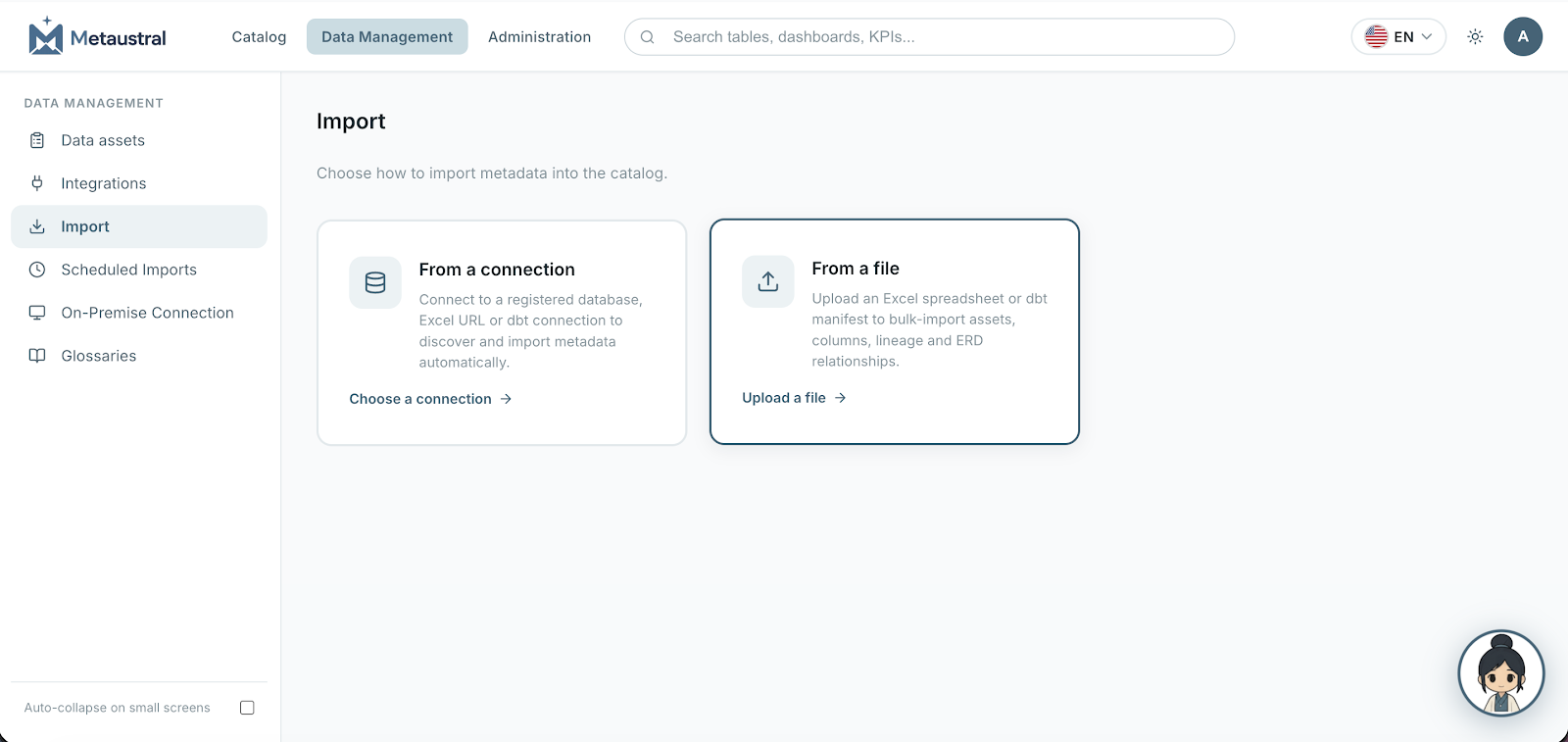
If your goal is to permanently migrate to a professional data management platform, you can import the completed template directly into Metaustral.
Once the import is complete, all your information assets will be available within the platform and can be managed from there. From that point on, you'll be able to create new records, update existing information, perform advanced searches, establish relationships between assets, and take advantage of all the features the platform provides.
This option is ideal for organizations that want to move away from spreadsheets and fully centralize their data management.
Option 2: Automatic Synchronization with Excel
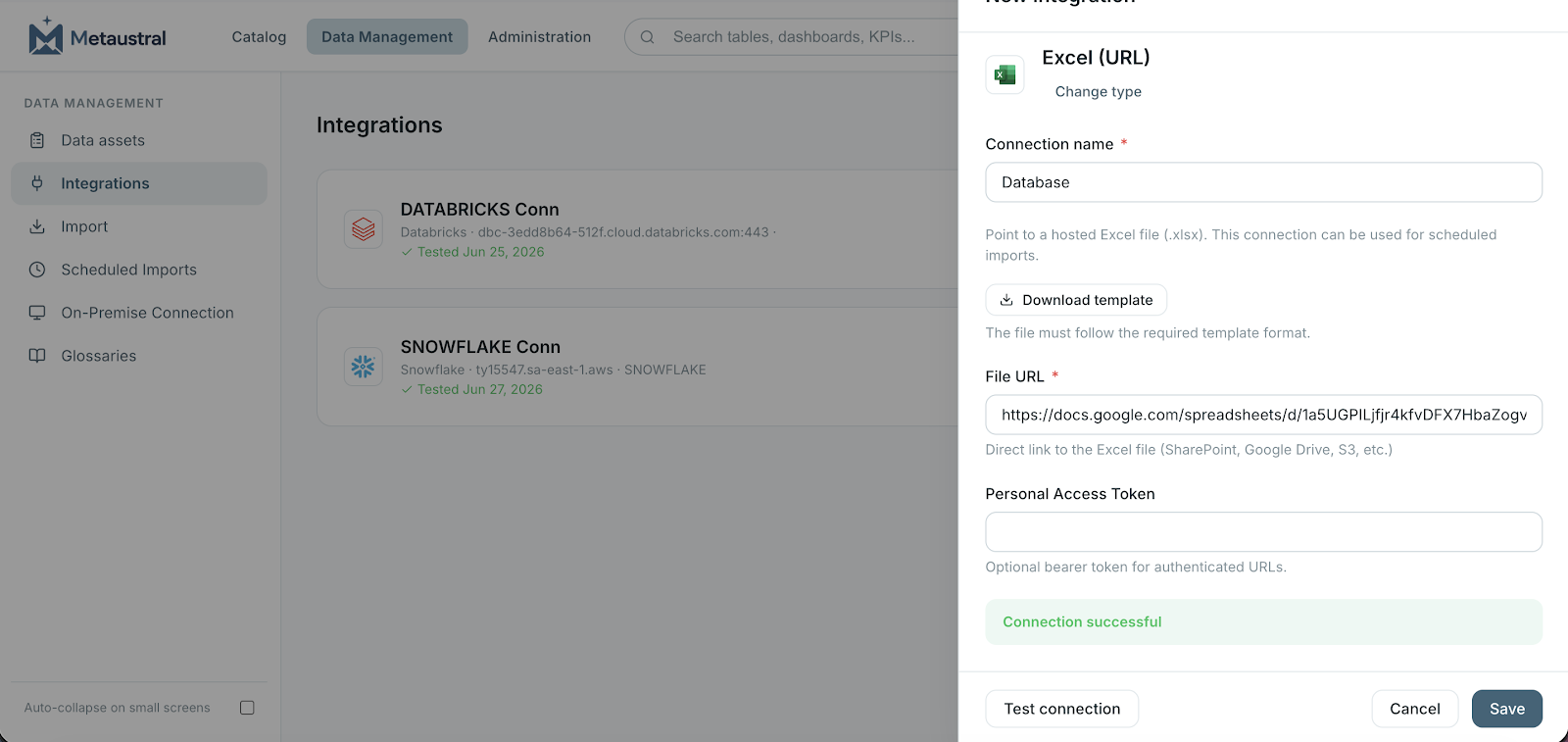
Not every organization is ready to stop using Excel immediately. That's why Metaustral also allows you to keep your Excel file as the source of data while automatically synchronizing it with the platform.
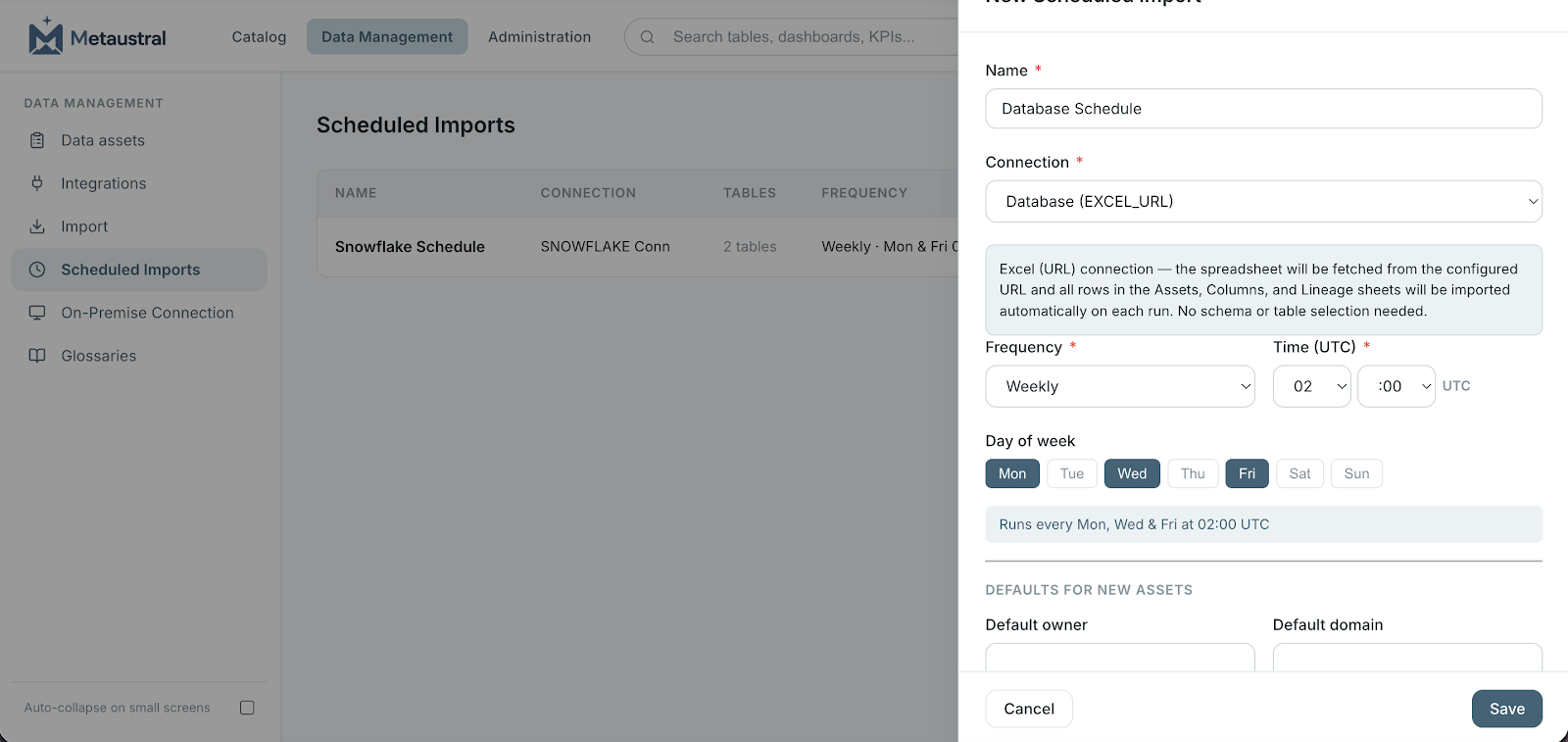
Simply store the template in Microsoft OneDrive, SharePoint, or Google Drive, then connect the file to Metaustral. From there, you can schedule automatic imports so that any changes made to the spreadsheet are automatically reflected in your data catalog.
This approach allows teams to continue working with the spreadsheets they're already familiar with while Metaustral maintains a centralized, up-to-date, and easily accessible data catalog for the entire organization.
This option is particularly useful when:
Users prefer to continue editing information directly in Excel.
Automated processes regularly generate or update Excel files.
Other business applications export data in Excel format as part of existing workflows.
The organization wants to transition gradually to a professional platform without immediately changing how every team works.
With this approach, Excel is no longer the final destination for your data—it becomes a data input source. Metaustral takes care of centralizing, organizing, and making that information available across the organization through a professional data catalog that provides advanced search capabilities, auditability, collaboration, and data management features far beyond those of a traditional spreadsheet.
Conclusion
Excel will continue to be an invaluable tool for organizing information, performing analysis, and managing small datasets. However, as a data catalog grows and becomes shared across multiple users and departments, its limitations become increasingly apparent.
A lack of version control, collaboration challenges, the inability to model relationships between data, and the growing risk of errors are all clear indicators that it's time to move to a solution specifically designed for professional data management.
Making this transition doesn't mean discarding the work you've already done. On the contrary, the best approach is to build on your existing information and transform it into a structured, centralized data catalog that can grow alongside your organization.
With Metaustral, this transition can happen at your own pace. You can import your catalog using an Excel template, keep your spreadsheets synchronized through OneDrive, SharePoint, or Google Drive, or continue using your existing workflows while Metaustral organizes and centralizes your information in a single platform.
The result is a more reliable, easier-to-maintain, and organization-wide data catalog that reduces the time spent searching for information and allows your teams to focus on using data to make better business decisions.
If you're currently managing your information assets in Excel, this may be the right time to take the next step. Download the Metaustral template, import your own data, and discover how easy it is to transform a collection of spreadsheets into a professional data catalog—without losing the work you've already invested.
If you'd like to learn more about Metaustral, explore its features, or see how it can support your organization's data management needs, we invite you to visit our website. There you'll find product information, real-world use cases, documentation, and additional resources to help you build a more efficient and scalable approach to data management.
👉 Learn more at: https://www.metaustral.com